Planning the costs of a home-based online travel agency
Starting a travel booking business from home means thinking carefully about where your money goes before you take the first client call. This checklist covers the main cost categories and helps you decide what to fund first.

This guide is for anyone planning to run an online travel agency from a spare room or home office in the UAE. It sets out the cost categories to plan for, explains what each one covers, and gives you a sensible order in which to tackle them. No figures are quoted here because costs vary widely by emirate, licence type and supplier agreement. What matters at the planning stage is knowing what you are budgeting for, and why.
Licensing and registration: check before anything else
Before you spend on a website, a desk chair or a booking platform, confirm what licensing and registration your business activity requires. The rules differ by emirate and by whether you operate as a sole trader or a company. Contact the relevant authority directly and ask what applies to an online travel agency operating from a residential address. Some activities require a physical office address rather than a home address, so have this conversation early. Treat any fee quoted by the authority as a fixed cost at the top of your budget, separate from everything else on this list.
For a broader view of the decisions involved in setting up a travel business from home, see How to start a tour or travel agency business from home in the UAE: the order of decisions.
Your home office setup: the physical foundation
A travel agency run from home still needs a proper working environment. The costs here fall into a few distinct groups.
Furniture and layout. A desk at the right height, a chair you can sit in for several hours without discomfort, and enough surface area to spread documents alongside a screen. If the room doubles as a guest bedroom or storage space, you may need shelving or a partition to keep client files and work materials apart from household items. Plan cable management and power access before you buy furniture, not after.
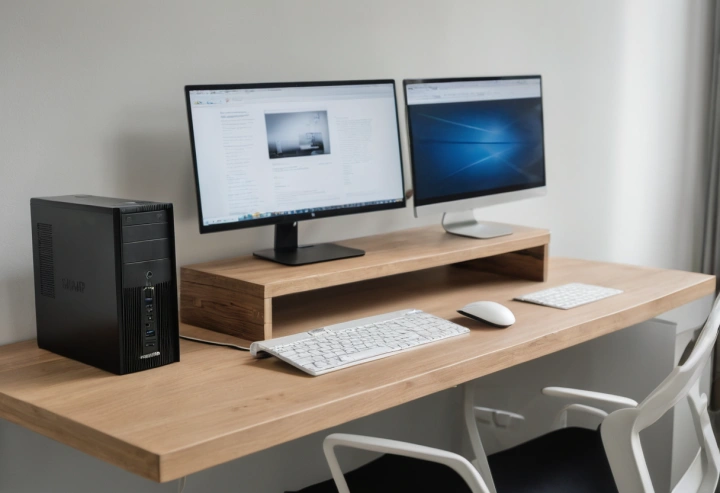
Computing equipment. A laptop or desktop that can run a browser with multiple tabs, a video call and an open document at once without slowing down. Budget for a second monitor: comparing itineraries, checking supplier portals and drafting client emails all go faster with two windows visible at once. A printer is useful for contracts and itinerary printouts, though many agents manage without one.
Connectivity. Home broadband stable enough for video calls and real-time booking systems. If your building has shared infrastructure or patchy coverage, allow for a mobile data backup. Booking platforms connected to airline inventory time out quickly on slow connections, and a dropped session mid-booking is a problem worth avoiding.
For more detail on the technology side of a home booking office, see The technology layer of a home office for a booking or travel business.
Booking technology: what it is and what it costs
This category most often surprises first-time planners, because booking technology covers several different things that are usually sold separately.
A customer-facing website. This is where clients browse packages, submit enquiries or make bookings. You can build one yourself with a general website tool, or use a ready-made platform built for travel agents. A ready-made platform, sometimes called a white-label portal, gives you a branded booking site without building the underlying search and payment functions from scratch. You pay a setup fee, then a recurring subscription. The trade-off is less design flexibility, but considerably less technical maintenance.
Supplier access and inventory connections. To search live flight availability and hotel rates, your system needs to connect to the databases holding that information. For flights, this usually means access through a global distribution system, known as a GDS, or a direct API connection with an airline or consolidator. An API is simply a way for two computer systems to exchange information automatically: your website sends a search request, the airline system returns available seats and prices. Access to these systems typically involves an agreement with a supplier or aggregator, and may carry a monthly fee, a per-booking fee, or both. Hotel inventory works similarly, through bed banks or direct hotel connections.
Payment processing. Accepting card payments online requires a payment gateway, a service that handles the transaction securely between your client and your bank. Gateways charge a percentage of each transaction and sometimes a monthly fee. You will also need a business bank account, with its own setup and maintenance costs depending on the bank.
Back-office tools. Customer relationship management software, itinerary builders, invoice generators and accounting tools all sit here. Some booking platforms bundle these in; others do not. Check what is included before assuming you need to buy separately.
Ongoing operational costs: the ones that accumulate
Setup costs are visible and easy to plan for. Running costs are quieter, and they catch people out who have not mapped them in advance.
- Software subscriptions for your booking platform, accounting tool and any CRM
- Supplier or aggregator membership fees, which may be monthly or annual
- Payment gateway transaction fees on every booking
- Professional indemnity or travel-specific insurance, if required by your licence or supplier agreements
- Marketing spend: a website with no visitors generates no bookings, so budget for some form of client acquisition from the start
- Continuing professional development or training, particularly if you are new to GDS systems or fare construction
The ratio of setup cost to running cost varies widely with the technology route you choose. A white-label platform with bundled tools carries a higher monthly fee but lower upfront development cost. A custom-built site has the opposite profile. Neither is inherently better; the choice depends on your expected booking volume and how quickly you need to be live.
How to prioritise: a sensible spending order
With limited capital, the order in which you spend matters. Here is a practical sequence.
First, resolve licensing and registration. Nothing else is usable until this is settled, and the answer may change what else you need to budget for.
Second, secure the home office basics: a reliable device, a stable internet connection and a functional workspace. These are unglamorous purchases, but they underpin everything else.
Third, choose your booking technology route and get a clear picture of the setup cost and the monthly commitment before signing anything. Ask suppliers for a full fee schedule, not just the headline price.
Fourth, set up payment processing and a business bank account. Test the whole booking flow end to end before taking real clients.
Fifth, allocate a marketing budget, however modest. Word of mouth takes time; a small paid presence or a well-maintained social profile helps bridge the gap.
Advice from an accountant or business setup consultant can save money at the licensing and banking stages, particularly if you are unfamiliar with UAE business structures. Factor that cost in rather than treating it as optional.
Your next step
Write down every cost category listed above and mark each as a fixed setup cost, a recurring monthly cost, or a variable cost tied to booking volume. Then contact the relevant UAE authority to confirm your licensing requirements before spending on anything else. That single conversation will clarify which costs are mandatory, which are negotiable and which can wait until your first few bookings are behind you.